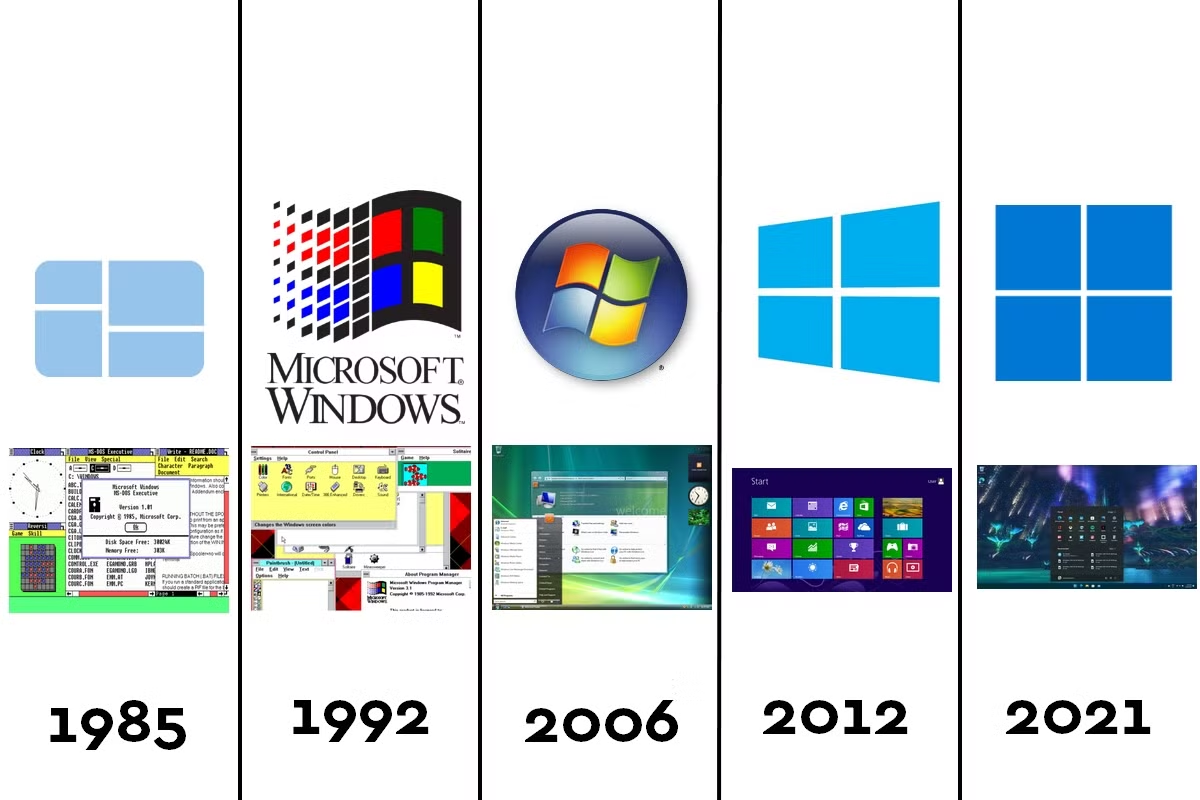
Windows OS Versions History: The Complete Timeline From 1985 to 2026
Every time you double-click an icon, drag a window across your screen, or right-click for a menu, you’re using ideas that trace back four decades. The Windows OS versions history is really the story of personal computing itself — how a clunky graphical shell running on top of MS-DOS grew into the operating system that powers over a billion devices worldwide today.
Whether you’re a tech enthusiast, a student researching computer history, or just someone curious about why your PC works the way it does, this guide walks through every major Windows release, what made it important, and how we got from Windows 1.0 to the Windows 11 of 2026.
Why Windows’ Version History Actually Matters
Before diving into dates and version numbers, it’s worth asking why this history is worth knowing at all. Understanding the evolution of Windows helps explain:
- Why certain features (like the Start menu or File Explorer) exist in their current form
- How Microsoft’s decisions shaped the entire PC industry
- Which versions introduced ideas — like touch computing or cloud integration — that we now take for granted
- How security, stability, and design priorities shifted over time
With that context, let’s go back to where it all began.#
How to See What Version of Windows I Have (5 Fast & Easy Methods)
The Early Years: Windows 1.0 to 3.1 (1985–1994)
Windows 1.0 (1985)
Microsoft’s first release wasn’t really a full operating system — it was a graphical add-on that ran on top of MS-DOS. It introduced windows, icons, and a mouse-driven interface at a time when most computing was done through text commands. It sold modestly, but it planted the seed for everything that followed.
Windows 2.0 (1987)
This version added overlapping windows (instead of just tiled ones) and keyboard shortcuts still familiar today Ctrl+C and Ctrl+V copy and paste.
Windows 3.0 and 3.1 (1990–1992)
Windows 3.0 was the first version to gain real commercial traction, thanks to improved performance and support for more memory. Window 3.1 followed in 1992, adding TrueType fonts and better multimedia support. This era made Windows a household name for the first time.
The DOS-Based Era Matures: Windows 95, 98, and Me (1995–2000)
Windows 95
This was a landmark release. Windows 95 introduced the Start menu, the taskbar, and plug-and-play hardware support — features that still define the Windows experience today. It merged the DOS and Windows environments more tightly and was a massive commercial success, with long lines forming outside stores on launch day.
Windows 98
Window 98 refined the 95 experience, adding better USB support, the Windows Driver Model, and integration with Internet Explorer, reflecting the growing importance of the internet.
Windows Me (2000)
Windows Millennium Edition was aimed at home users and introduced System Restore, but it’s widely remembered as one of the more unstable releases in Windows history.
The Business Backbone: Windows NT and 2000
While consumer versions of Windows ran on DOS, Microsoft was quietly building a more stable, enterprise-grade operating system: Windows NT. Released starting in 1993, NT (New Technology) offered better security and reliability for businesses. Window 2000, released in 2000, continued this line and became a critical foundation for what came next.
Windows XP: The Version People Refused to Give Up (2001)
Windows XP merged the consumer-friendly DOS-based line with the stability of the NT architecture, and the result was one of the most beloved operating systems Microsoft has ever shipped. With its Luna interface, improved multitasking, and long-term reliability, XP stayed in widespread use for over a decade — some systems still ran it a decade after release, a testament to how well it worked.
Windows Vista: The Ambitious Misstep (2007)
Windows Vista introduced the Aero glass interface, improved security through User Account Control, and better search tools. However, high hardware requirements and driver compatibility issues gave it a rocky reputation, and many users skipped it entirely, waiting instead for its successor.
Windows 7: Redemption and Widespread Love (2009)
Windows 7 fixed much of what frustrated users about Vista. It was faster, more stable, and introduced a refined taskbar with pinned apps and jump lists. It became one of the most popular Windows versions ever and remained in heavy use for years even after official support ended.
Windows 8 and 8.1: The Touch Experiment (2012–2013)
Windows 8 took a bold gamble, introducing the tile-based Start screen designed for touchscreens, aimed at competing with tablets. But removing the traditional Start menu confused desktop users, leading to significant backlash. Windows 8.1 walked back some of these changes, partially restoring familiar navigation.
Windows 10: The “Last Version of Windows” (2015)
Window 10 brought back the Start menu, introduced the Cortana virtual assistant, and shifted to a “Windows as a service” model with regular feature updates instead of entirely new paid releases every few years. Microsoft even called it the last version of Windows versions at launch, planning to update it continuously rather than replace it — though that promise didn’t quite hold, as Windows 11 later proved. Window 10 became one of the most widely adopted operating systems in history, running on desktops, laptops, tablets, and even Xbox consoles.
Windows 11: The Current Generation (2021–Present)
Windows 11 launched in October 2021 with a redesigned, centered Start menu, rounded corners, and tighter integration with Microsoft Teams and Android apps. It also raised hardware requirements significantly, requiring TPM 2.0 chips, which left many older PCs unable to upgrade.
Since launch, Windows 11 has evolved through several major feature updates:
- Windows 11 22H2 and 23H2 refined performance, added new File Explorer tabs, and expanded AI-assisted features
- Windows 11 24H2 brought deeper Copilot integration and performance improvements for newer hardware
- Windows 11 25H2 continued the rolling update model, focused on reliability and enterprise features
- Windows 11 26H1, rolling out in 2026, is scoped specifically for new devices launching that year, built around newer silicon for better performance and battery life
As of mid-2026, Windows 11 continues to receive monthly cumulative updates packed with incremental features rather than one big yearly overhaul. Recent updates have introduced tools like point-in-time system restore, quieter default widget behavior, and expanded accessibility options such as full-screen color overlays for reduced eye strain. Microsoft has also been rolling out updated Secure Boot certificates across most devices throughout 2026 to keep systems protected long-term.
It’s worth noting that older editions are gradually being phased out: Windows 11 version 24H2 Home and Pro editions are set to reach end of updates in October 2026, with Microsoft actively encouraging users to move to newer supported versions.
A Quick-Reference Timeline
| Version | Release Year | Signature Feature |
|---|---|---|
| Windows 1.0 | 1985 | First graphical interface |
| Windows 3.0/3.1 | 1990–1992 | Commercial breakthrough |
| Windows 95 | 1995 | Start menu, taskbar |
| Windows 98 | 1998 | Internet integration |
| Windows Me | 2000 | System Restore |
| Windows 2000 | 2000 | NT-based stability for business |
| Windows XP | 2001 | Long-term reliability, Luna UI |
| Windows Vista | 2007 | Aero UI, UAC security |
| Windows 7 | 2009 | Refined taskbar, stability |
| Windows 8/8.1 | 2012–2013 | Touch-first Start screen |
| Windows 10 | 2015 | Windows as a service |
| Windows 11 | 2021–present | Centered UI, AI integration |
What the History of Windows Teaches Us
Looking across four decades of the Windows OS versions history, a few patterns stand out. Microsoft rarely gets everything right on the first attempt — Vista and Windows 8 prove that — but it consistently listens to user feedback and course-corrects in the next release, as seen with Windows 7 and Windows 8.1. The shift from boxed, once-every-few-years releases to continuous, cloud-connected updates also reflects a broader industry trend: operating systems today are treated less like static products and more like evolving services.
For everyday users, this history isn’t just trivia. It explains why certain habits — like pinning apps to a taskbar or searching directly from the Start menu — have stuck around for decades, refined but rarely reinvented from scratch.
Frequently Asked Questions
What was the first version of Windows? Windows 1.0, released in 1985, was Microsoft’s first version, though it functioned more as a graphical shell over MS-DOS than a standalone operating system.
Which Windows version was most popular? Windows 7 and Windows 10 are both widely regarded as among the most popular and well-liked versions, thanks to their stability and user-friendly design.
Is Windows 11 the newest version of Windows? Yes, as of 2026, Windows 11 is the current version, receiving regular feature updates such as 24H2, 25H2, and 26H1 rather than being replaced by an entirely new numbered release.
Why did Microsoft skip Windows 9? Microsoft never released a “Windows 9,” moving straight from Windows 8.1 to Windows 10, a decision widely believed to be aimed at distancing the new OS from the mixed reception of Windows 8.