Every fall, Mac users face a familiar question: to upgrade or not to upgrade? With the release of macOS 15 Sequoia, that question feels heavier than usual. This isn’t just about getting new wallpaper or a tweaked settings menu. Sequoia represents a philosophical shift for Apple. It is the bridge between the “old Mac” of productivity apps and local storage and the “new Mac” of cloud-based AI and deep, almost invasive, iPhone integration.
While early adopters have been tinkering with the betas, the dust is finally settling. Community benchmarks, battery-drain reports, and real-world usage data have piled up since launch, giving us a much clearer picture of whether Apple Intelligence is genuinely useful or just a glorified spell-checker.
But there is a twist. As I write this in early 2026, macOS Sequoia is no longer the shiny new toy. Apple has already moved on to unveiling macOS Tahoe (macOS 26) . So, why talk about Sequoia now? Because unlike the flashy, sometimes unstable, betas of Tahoe, Sequoia has matured into the safe harbor. With updates like 15.7.4 rolling out, it has become the “High Sierra” of this generation—stable, secure, and reliable .
So, is Sequoia the operating system that actually delivers on Apple’s promises? Let’s crack open the hood.
Related:
The Complete Guide to Uninstalling Applications on macOS
The “Apple Intelligence” Reality Check
The headline feature of macOS Sequoia was, without a doubt, Apple Intelligence. At WWDC 2024, Apple showed us a future where Siri could manipulate documents, where Genmoji could create custom emojis on the fly, and where your Mac would understand your personal context. It sounded like Star Trek.
Now that we are several point releases deep (including 15.5 and 15.7), what is the verdict? It is a work in progress.
First, the good news: The backend optimization is real. Early benchmarks noticed a significant jump in Neural Engine performance on M-series Macs moving from Sonoma to Sequoia—some users reported an uplift of nearly 20% in AI inference tasks . Those gains are tangible now. When you use the Writing Tools to proofread an email or summarize a dense research paper, it happens almost instantly. The Clean Up tool in Photos, which removes background objects, is genuinely magic and rivals Google’s software.
However, the cracks show in the “Intelligence” part. The personalized Siri—the one that could find your “Mom’s flight arrival time” by cross-referencing Messages and Mail—is still delayed (pushed to early 2026) . For Sequoia users, Siri is smarter, sure. The interface is a glowing border around the screen, and typing to Siri is smoother, but it doesn’t feel like a “genius” assistant yet.
In fact, macOS Sequoia has become a curious case of “what you see is what you get” regarding AI, especially when compared to its successor, Tahoe. Sequoia laid the foundation, but Tahoe is building the house. If you are still on Sequoia today, you will notice that Apple Intelligence feels polite but occasionally dumb. It is excellent for text rewriting but not yet for life management.
The Killer Feature You Are Actually Using: iPhone Mirroring
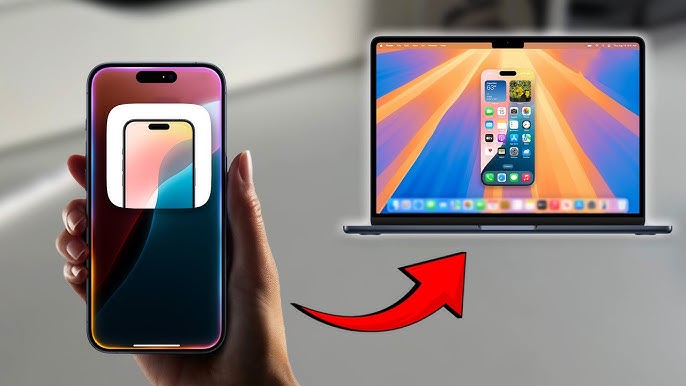
While we wait for the AI revolution, Apple quietly released a feature in Sequoia that has fundamentally changed how I work: iPhone Mirroring.
Remember the old days of Continuity, where you could copy on your iPhone and paste on your Mac? That was adorable. Sequoia lets you click an icon in your Dock and your iPhone screen appears on your Mac. You can unlock it with your Mac’s password, open Instagram (which famously has no iPad app), scroll TikTok, or respond to a banking app that doesn’t exist on macOS .
For productivity nerds, this is a massive deal. It kills the distraction of picking up your phone. You can drag and drop photos from your iPhone’s camera roll directly into a Keynote presentation on your Mac without ever touching the phone. You can have your phone sitting in a drawer charging while you reply to iMessages via the native Mac app and a stray WhatsApp notification via the mirrored screen.
Is it perfect? No. The audio routing can be finicky, and dragging files across the void sometimes fails. But compared to the “Stage Manager” flop of Ventura, iPhone Mirroring is a genuine quality-of-life upgrade that works for 99% of users.
The Intel Apocalypse: Compatibility and Performance
If you are holding onto an Intel Mac—especially one from 2018 or 2019—macOS Sequoia might be the end of the road for you, or at least the end of smooth sailing.
While the official compatibility list blesses some late-generation Intel Macs (like the 2019 iMac and 2018 MacBook Pro), the experience is vastly different depending on your silicon . If you have an M1 or M2 Mac, Sequoia feels fast. User benchmarks suggest that Sequoia has surpassed Ventura and Sonoma in raw speed, especially in Safari, which has seen massive JavaScript performance boosts .
However, Apple Intelligence is an Apple Silicon exclusive . If you are on an Intel Mac running Sequoia, you basically have a fancy UI update and the Passwords app, but you are locked out of the “future” of the OS. On M-series Macs, Sequoia runs like a dream. On Intel Macs, many users report it feels sluggish, like the system is straining against its limits.
This is textbook Apple strategy. They are not just dropping support for Intel; they are making the experience on Intel just annoying enough to force an upgrade to an M-series chip.
Under the Hood: Gaming, Window Tiling, and the Little Things
Beyond the big tentpoles, Sequoia is a masterclass in “refinement.” For years, Mac users begged for proper window tiling. We used third-party apps like Magnet or Rectangle. In Sequoia, Apple finally baked it into the OS. Dragging a window to the edge of the screen now snaps it into a quarter of the display, with suggested layouts popping up dynamically. It is not as powerful as Rectangle Pro, but it is good enough for 90% of users .
Then there is gaming. Apple is trying so hard to make Mac gaming happen. Sequoia introduced the Game Mode, which prioritizes CPU and GPU resources for your game, drastically reducing latency with AirPods and controllers. Does it turn your MacBook into a Steam Deck? No. But for games like Resident Evil Village or Death Stranding, the performance frame-pacing is noticeably smoother than on Sonoma .
Let’s not forget the Passwords app. It has been a long time coming. Ripping password management out of Safari Settings and giving it a native home is a godsend for less technical users. It is a simple password manager that syncs via iCloud, supports two-factor authentication codes, and just works .
macOS Sequoia vs. The Future (Tahoe)
It would be irresponsible to review Sequoia without acknowledging the elephant in the room: macOS Tahoe (macOS 26) . Sequoia users face a choice: stay or go?
Tahoe introduces a “Liquid Glass” UI—froster backgrounds, chunkier Control Center buttons, and deeper Vision Pro integration . It is prettier, but is it faster? Early reports suggest Tahoe has a larger install size (roughly 1GB more) and drains the battery faster on identical hardware .
Furthermore, Tahoe drops support for Intel entirely, marking the absolute end of the line for Hackintoshes and older Pros .
So, where does that leave Sequoia? Sequoia is currently the “safe” version. If you are a creative professional with expensive plugins (audio interfaces, legacy Adobe software), you should stick with Sequoia 15.7.x. It is stable. It is security-patched. The bugs are known and documented . Tahoe is exciting, but like Sequoia was in its beta days, it is a little unpolished.
The Verdict: Should You Install Sequoia Today?
If you haven’t upgraded from Ventura or Sonoma yet, do it. Unless you are on a 2017 iMac that barely survived the transition, macOS Sequoia updated is the best version of macOS for Apple Silicon in 2026.
Here is the breakdown:
- Upgrade if: You own an M1 Mac or later. iPhone Mirroring will change your workflow. The new Passwords app is a great iCloud Keychain upgrade. You want the most stable platform for gaming on a Mac.
- Hold off if: You rely on specific Intel-based plugins that haven’t been updated in years. You hate the idea of Apple Intelligence data mining (though it is mostly on-device).
- Wait for Tahoe if: You love visual glitz and want the iPad-ification of the Mac to be complete.
macOS Sequoia is a testament to Apple’s “tick-tock” cycle. macOS Ventura and Sonoma felt like experiments. Monterey felt like maintenance. Sequoia feels like the resolution. It takes the iPhone synergy, adds a necessary layer of AI, and polishes the rough edges of window management. It is professional, powerful, and finally ready for prime time.
As we look toward Tahoe and the future of “Liquid Glass,” take a moment to appreciate Sequoia. It might not have changed the world, but for the first time in years, it made the Mac feel like it belongs in the era of the Vision Pro and the AI chatbot—without losing the plot.